JSON Parser Explained: How JSON Parsing Works and Common Errors
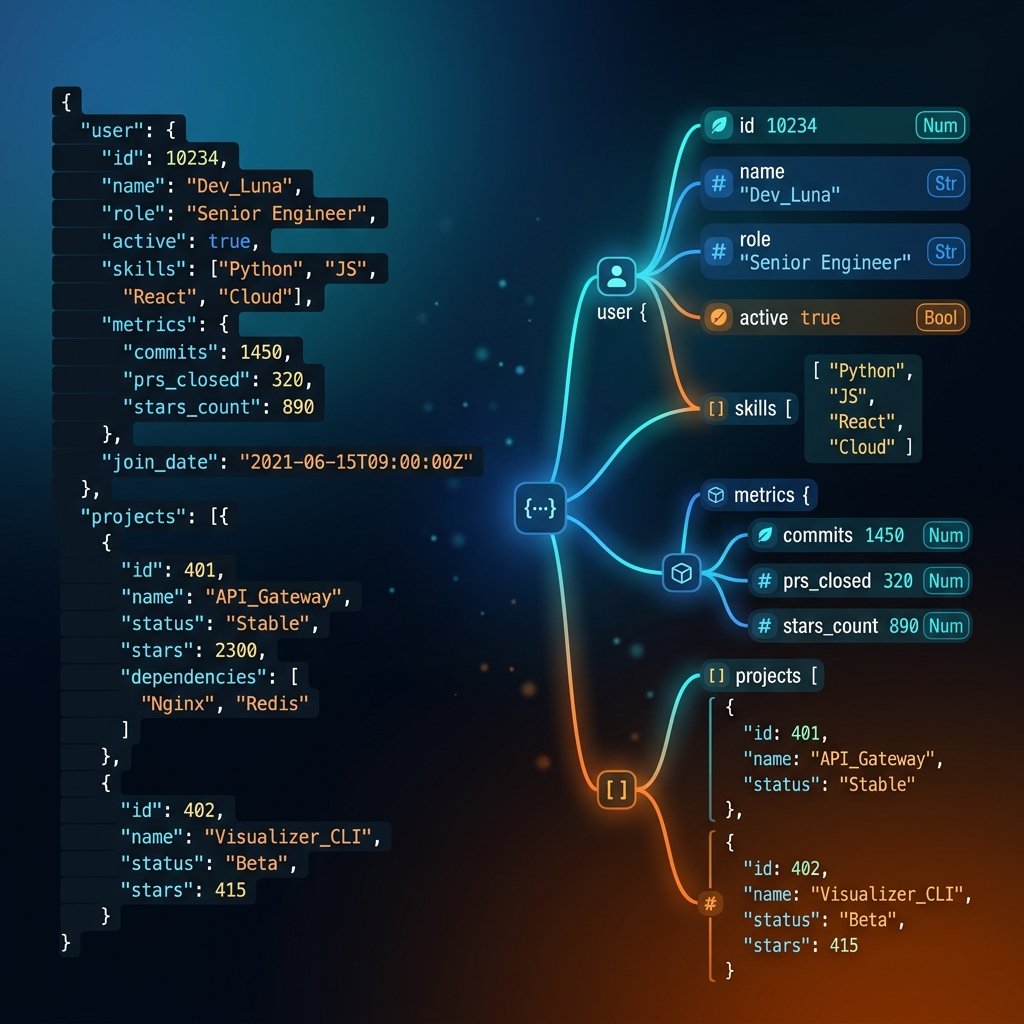
Need to parse, clean, or validate raw JSON code? JavaScript Object Notation (JSON) is the standard format for exchanging data across APIs, databases, and application configuration profiles. However, machine-optimized JSON is notoriously hostile to the human eye, stripping away spacing, line breaks, and indents into a single collapsed wall of text.
A JSON parser is a specialized software engine or library subroutine that reads raw plain-text strings formatted according to JavaScript Object Notation standards and converts them into native, queryable runtime entities in memory. These entities include objects, arrays, dictionary maps, lists, or custom classes, depending on the programming language environment.
What is a JSON Parser?
A JSON parser is a software routine that reads a serialized JSON plain text string and translates it into native runtime memory structures (like objects, dictionaries, or arrays) for computer applications to interact with.
What Is a JSON Parser?
A JSON parser is a specialized software engine or library subroutine that reads raw plain-text strings formatted according to JavaScript Object Notation standards and converts them into native, queryable runtime entities in memory. These entities include objects, arrays, dictionary maps, lists, or custom classes, depending on the programming language environment.
By nature, JSON is purely a serialized text format. While plain-text structures are highly reliable for transmitting payloads over the HTTP wire, modern CPU architectures cannot directly calculate keys, values, or indices inside a single continuous string. The parser acts as a translator, reading each character to build structured logical blocks in the system RAM. The input is a raw, serialized text string; the output is a native memory pointer mapped to key-value objects.
Unlike a visual JSON Formatter or JSON Beautifier which only adds layout spacing and markup colors for human readability, a true parser acts at a deeper syntactic level to instantiate variables in application memory. To understand the differences, developers frequently compare parsing to formatting workflows.
What Does JSON Parsing Mean?
JSON parsing represents the transition of data from a serialized state (represented as plain text) to an active state (represented as in-memory data structures). A typical client-server exchange highlights this cycle:
- An API server serializes database parameters into a plain-text JSON string (using methods like
JSON.stringify()or Python'sjson.dumps()). - The serialized plain text travels over the web socket or HTTP channel as byte segments.
- Upon receipt, the client browser or application receives the raw text payload.
- The application calls its local JSON parser to compile the text.
- The parser validates the syntax, maps elements to keys/values, and instantiates the program object.
- The application queries data parameters, runs loops, or updates database structures.
Without parsing, JSON remains an inert sequence of text characters (or bytes) which cannot be dynamically queried or read by software logic. In complex modern pipelines that convert data between different structures, developers often translate payloads using tools like the XML to JSON Converter or JSON to XML Converter to restructure inputs before parsing them natively.
How JSON Parsing Works Internally
Internally, a JSON parser acts similarly to a small programming language compiler or interpreter. It processes input characters through a structured compilation pipeline comprising lexical analysis, tokenization, validation, and object creation:
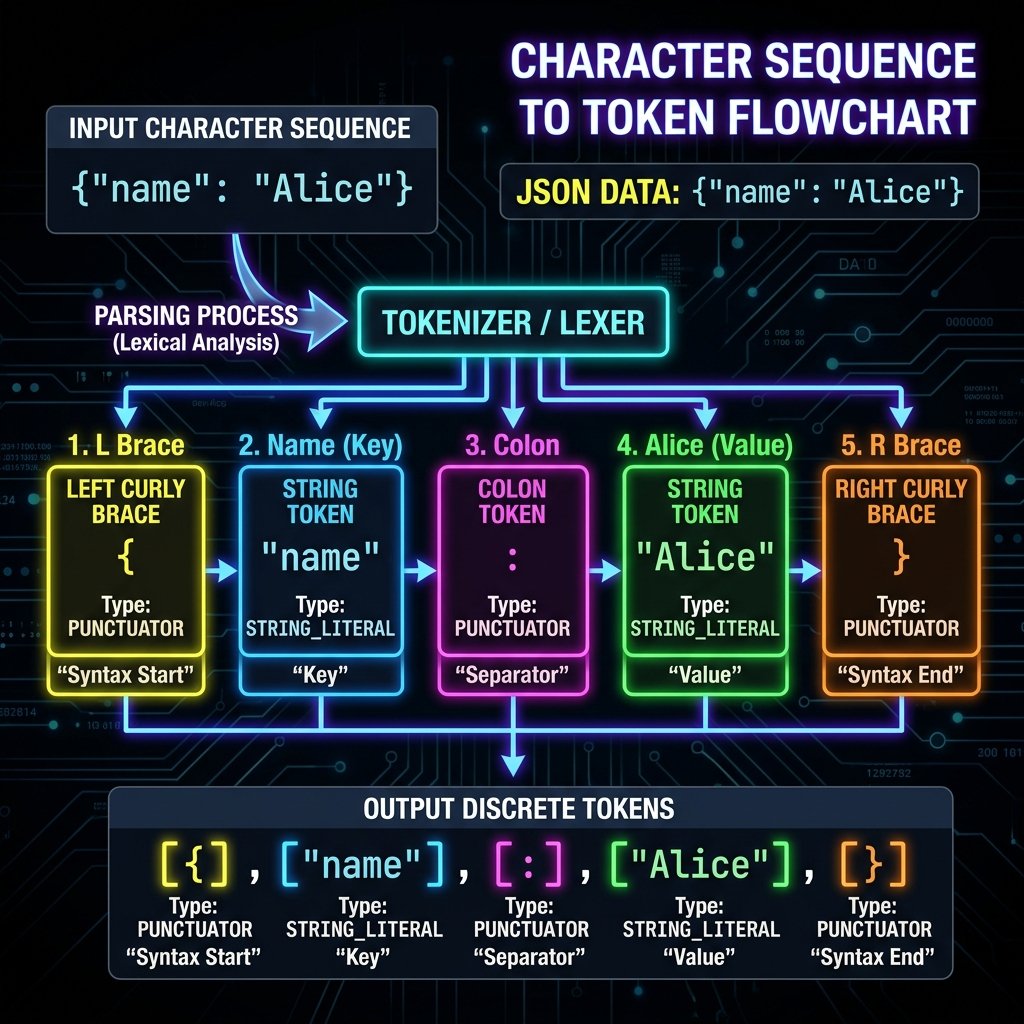
1. Lexical Analysis (Scanning)
The parser starts at index 0 of the string and reads character-by-character. It ignores insignificant whitespace (spaces, tabs, carriage returns, newlines) outside of string literals. The scanner groups legal sequences of characters into units called tokens. Key token classifications include:
{and}representing object start and end boundaries.[and]representing array start and end boundaries.:representing name-value delimiters.,representing element separations.- String literals wrapped in double quotes (e.g.
"identifier"). - Primitive literals (
true,false,null) and numeric segments.
During this scanning phase, the tokenizer also validates character encoding. Unescaped special characters inside strings will immediately crash the scanner. For details on how to correctly parse control sequences, check out our guide on JSON Escape Characters Explained.
2. Syntax Validation
While compiling tokens, the parser continuously evaluates whether the sequence matches the structural rules defined in RFC 8259. For instance, if the parser scans a colon token :, it validates that the preceding token was a string literal key. If it encounters a key without double quotes, a trailing comma without a subsequent value, or mismatched array brackets, it immediately halts compilation to prevent system corruption, throwing a syntax exception.
3. AST / Object Tree Construction
Once tokens are validated, the parser constructs a hierarchy tree representing the parent-child relationships. The root of the JSON file (either an object {} or array []) serves as the base node. Nested object keys, child array variables, and sub-attributes branch out as child nodes. This visual tree hierarchy is translated into system pointers, mapping parent keys directly to the physical memory addresses of their children.
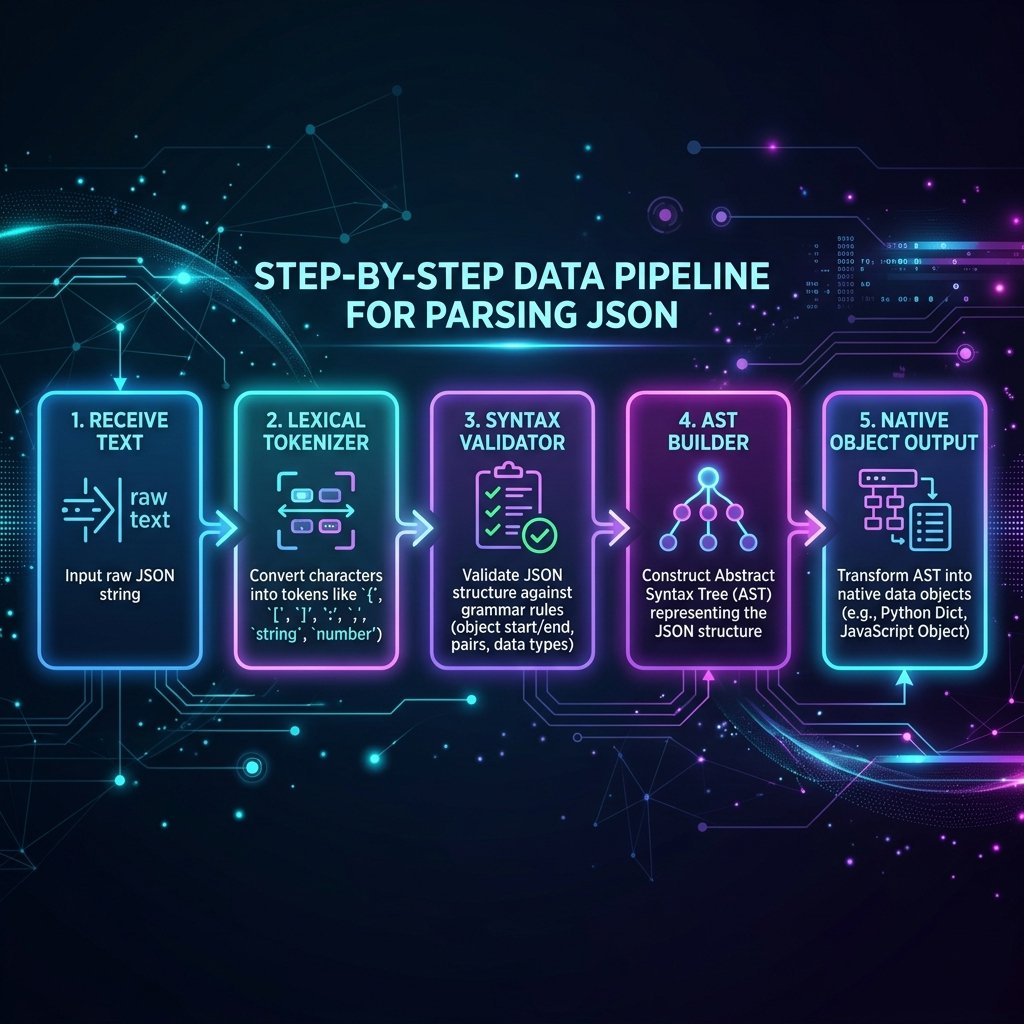
JSON Parsing Process Step-by-Step
To visualize the execution flow of a parser, trace a step-by-step transaction pipeline:
- Receive Raw Payload: The program fetches plain-text characters (e.g.,
{"id": 402, "active": true}). - Read & Scan Characters: The lexical engine matches characters to token types.
- Verify Token Sequence: The validation compiler checks if tokens match standard grammar layouts.
- Build Memory Nodes: The builder creates object instances and fills key properties in RAM.
- Instantiate Native Output: The compiler returns the completed runtime object reference.
- Application execution: The program accesses variables (e.g. reading
object.idor checkingobject.active).
JSON Parser Example
Consider the following raw plain-text JSON string:
{"name": "Alice", "age": 28, "city": "Delhi"}When this string is fed to a JSON parser, the engine executes the following internal conversions:
- Lexer scan: Identifies tokens:
{(object start),"name"(string),:(delimit),"Alice"(string),,(comma),"age"(string),:(delimit),28(numeric),,(comma),"city"(string),:(delimit),"Delhi"(string), and}(object end). - Grammar validation: Verifies that brackets match, commas separate key-value parameters correctly, and keys are double-quoted.
- Object assignment: Instantiates an empty hash-map structure. It maps the key
nameto string literal"Alice", keyageto numeric literal28, and keycityto string literal"Delhi". - Return reference: The engine returns a pointer to the compiled object. The developer can now execute commands like
console.log(user.name), returning"Alice"instantly.
JSON Parsing in JavaScript
JavaScript provides native support for JSON operations through the global, built-in static JSON object. To parse a JSON string, developers call JSON.parse():
// Raw JSON serialized text string
const jsonString = '{"product": "Laptop", "price": 1200, "inStock": true}';

try {
  // Parse the plain-text into a native JavaScript object
  const data = JSON.parse(jsonString);

  // Output and query the compiled variables
  console.log(data.product); // Output: Laptop
  console.log(data.price);   // Output: 1200
  console.log(typeof data);  // Output: object
} catch (error) {
  console.error("Syntax violation caught: ", error.message);
}
When using JavaScript's parser, wrap keys in double quotes. Single quotes (e.g. {'product': 'Laptop'}) are illegal in standard JSON and will cause JSON.parse() to crash with an Unexpected token error. To optimize file size before transmission, you can run formatted strings through a client-side JSON Minifier.
JSON Parsing in Python
Python parses JSON using its standard, built-in utility module called json. The primary method for compiling a JSON text string into a native Python dictionary object is json.loads() (which stands for "load string"):
import json

# Serialized plain-text JSON payload
json_string = '{"service": "Authentication", "port": 8080, "secure": false}'

try:
    # Compile text string into Python dictionary
    config = json.loads(json_string)

    # Query properties
    print(config["service"])  # Output: Authentication
    print(config["port"])     # Output: 8080
    print(type(config))       # Output: <class 'dict'>
except json.JSONDecodeError as err:
    print(f"Decoding failed: {err}")
Python automatically converts JSON values into native types: JSON true/false become Python booleans True/False, JSON objects become Python dictionaries, arrays become lists, and JSON null is parsed as None.
JSON Parsing in Java
Java does not include JSON parsing capabilities natively in its core runtime library. Instead, the Java ecosystem relies on high-performance open-source external libraries. The two most popular standards are Google's **Gson** library and FasterXML's **Jackson** library.
Java parsing using Gson:
import com.google.gson.Gson;
import com.google.gson.JsonObject;

public class Main {
    public static void main(String[] args) {
        String jsonText = "{\"app\":\"GetLocalTools\",\"status\":\"active\"}";

        Gson gson = new Gson();
        // Parse the text into a Gson JsonObject
        JsonObject obj = gson.fromJson(jsonText, JsonObject.class);

        System.out.println(obj.get("app").getAsString()); // Output: GetLocalTools
    }
}
Java parsing using Jackson:
import com.fasterxml.jackson.databind.ObjectMapper;
import com.fasterxml.jackson.databind.JsonNode;

public class Main {
    public static void main(String[] args) {
        String jsonText = "{\"app\":\"GetLocalTools\",\"status\":\"active\"}";

        try {
            ObjectMapper mapper = new ObjectMapper();
            // Parse text into a queryable Jackson JsonNode tree
            JsonNode rootNode = mapper.readTree(jsonText);

            System.out.println(rootNode.get("app").asText()); // Output: GetLocalTools
        } catch (Exception e) {
            e.printStackTrace();
        }
    }
}
Common JSON Parsing Errors
If a parser hits a single violation of standard JSON formatting rules, it halts compilation immediately to prevent data contamination. The table below lists the most frequent parsing mistakes, why they cause failures, and how developers can fix them:
| Error Classification | Mishap Reason | Correct Syntax Resolution |
|---|---|---|
| Missing Comma | Multiple key-value blocks are stacked without a separating comma separator. | Add a comma , at the end of the line preceding the new key. |
| Mismatched Quotes | Keys or values are wrapped in single quotes (e.g. 'key') or quotes are unescaped inside strings. |
Use strict double quotes " around keys and strings, and escape inner quotes with a backslash (\"). Learn more in the JSON Escape Characters Guide. |
| Trailing Comma | A comma exists after the last key-value element or array index (e.g. {"id": 1,}). |
Delete the trailing comma before the closing brace } or bracket ]. |
| Unexpected Token | Invalid characters, unquoted text, or formatting symbols exist outside double quotes. | Verify bracket bounds and wrap text variables in double quotes. |
| Mismatched Brackets | Braces {} or array square brackets [] open but fail to close. |
Verify matching bounds. Formatter guides like JSON Formatter vs JSON Validator help isolate these structure boundaries. |
| Wrong Primitive Types | JSON boolean literals are declared with capitalizations (e.g. True, False, or NULL). |
Write primitive flags in absolute lowercase: true, false, null. |
How to Debug JSON Parsing Problems
When a parser raises an error, the exception message usually reports a character offset or line coordinate (e.g. SyntaxError: Unexpected token 'p' at line 4 column 12). To systematically debug these issues, developers should follow this reliable workflow:
- Isolate the Coordinates: Read the error coordinates provided by the debugger. If the JSON payload is compressed into a single line, locate the index offset or use a formatting engine to expand the file vertically.
- Visualize Structure: Load the file in a formatter to view parent-child boundaries. For details on how formatting differs from raw minification, read the JSON Beautifier vs JSON Minifier comparison.
- Run Validation Tests: Use online utilities or local validators to pinpoint the exact line, key, or colon violating formatting rules. For validation best practices, see the How to Validate JSON Guide.
- Correct and Reparse: Repair the unescaped backslashes, trailing commas, or missing brackets, then reload the clean string into the parser tool.
Using privacy-first offline tools like the JSON Validator on GetLocalTools makes this debugging workflow simple, identifying syntax violations locally without sending data to third-party servers.
JSON Parser vs JSON Formatter
While often confused, parsers and formatters serve fundamentally different purposes in data pipelines. A formatter visualizes data for human reading, while a parser translates text for machine calculations:
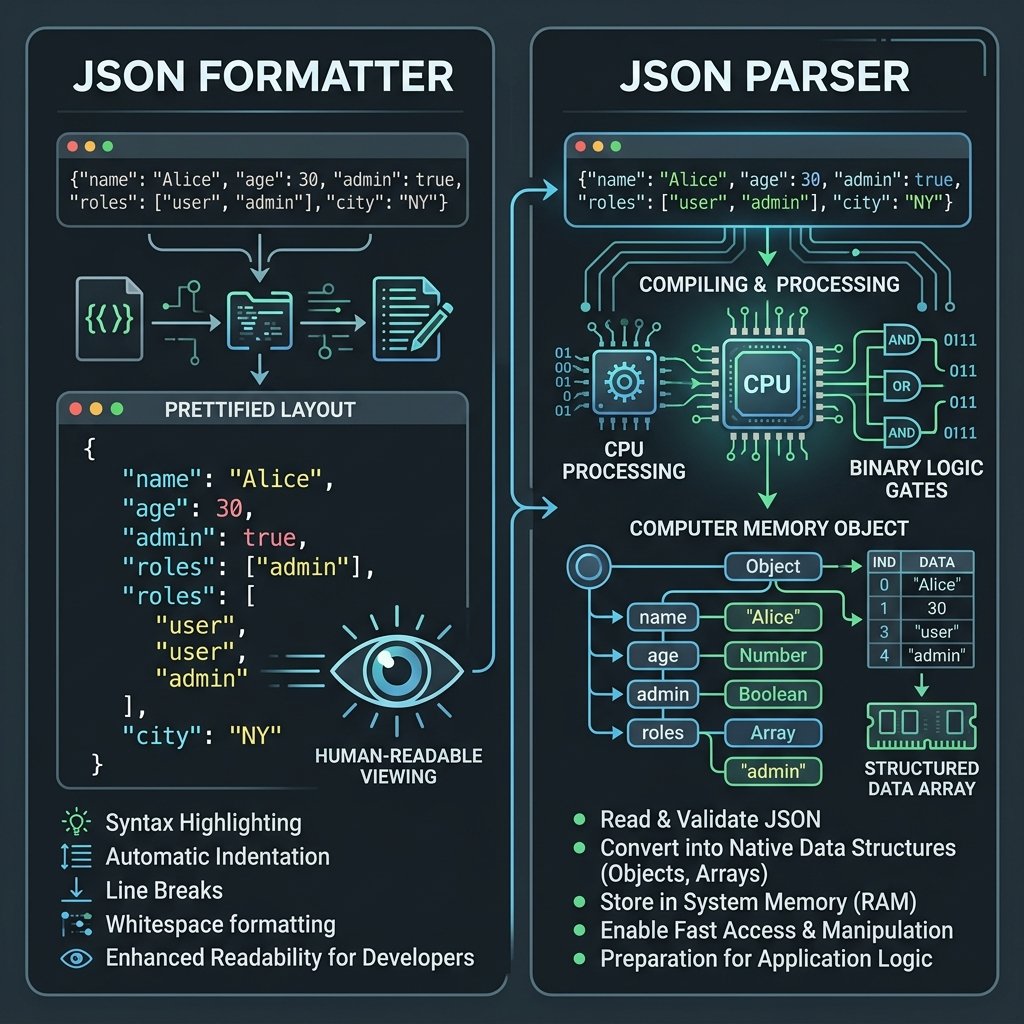
| Feature Matrix | JSON Parser Tool | JSON Formatter Utility |
|---|---|---|
| Primary Target | Computers and programming language runtimes. | Human eyes and software developers. |
| Core Output | An object array or key-value map in memory. | A readable text string with newlines and indentation. |
| Visual Formatting | Strips whitespaces, tabs, and layout stylings. | Adds layout structure, alignment, and color code themes. Read more in JSON Pretty Print explained. |
| Compilation Role | Instantiates database assets or active variables. | Beautifies valid code blocks for viewing. Learn more in JSON Minifier vs JSON Formatter. |
JSON Parser vs JSON Validator
Similarly, parsers differ from validators. While both verify formatting grammar, they handle inputs differently when errors are caught:
- JSON Validator: Analyzes a text string for syntax compliance. If syntax errors exist, it reports their exact line coordinates to help developers debug, but it does not allocate memory for objects.
- JSON Parser: Aims to compile the text into memory variables. If syntax errors are present, the parser crashes, halting the application's runtime flow.
For a detailed breakdown of these differences, refer to our comparison guide: JSON Formatter vs JSON Validator. To compare JSON against other structured formats, see the JSON vs XML Analysis.
Performance Considerations
Parsing is often the most CPU-intensive step when an application processes API responses. Large payloads can impact latency and device performance in several ways:
- Heap Allocation Overhead: If your application parses a massive 50MB database string, the parser instantiates hundreds of thousands of keys and nested objects in memory, which can lead to high RAM utilization and trigger garbage collection freezes.
- Single-Thread Blocking: Native operations like JavaScript's
JSON.parse()run synchronously on the main UI thread. Parsing large files block UI interactions, causing web page lag. - Streaming Parsers: For very large datasets, use streaming parsers (like Oboe.js in web browsers or Jackson Streaming in Java). They parse data chunk-by-chunk as it arrives over the network, avoiding loading the entire file into memory at once.
Security Best Practices
Because JSON parsing processes untrusted user data, it can present security risks if implemented incorrectly. Protect your applications by adopting these security best practices:
- Limit Payload Size: Set strict maximum size limits on API gateways (e.g. max 5MB payloads). This prevents malicious users from initiating Denial of Service (DoS) attacks by sending massive JSON strings that crash your servers.
- Avoid Prototypes Pollution: In JavaScript, malicious payloads can contain properties like
"__proto__". If parsed values are merged recursively into global configurations without sanitization, attackers can inject keys that alter your application's global behaviors. - Validate Schema Configurations: Run validation checks on parsed objects against a strict JSON Schema configuration to verify that required keys, types, and value formats align with expected types before processing them.
Privacy Benefits of Browser-Based JSON Tools

Many online tools send your JSON payloads to external cloud servers to validate or format them. If your JSON contains sensitive database records, user emails, or private API keys, copying it into external sites poses a significant data security risk.
GetLocalTools provides privacy-first, browser-based utilities that process all your data locally on your device:
- In-Memory Processing: Your inputs are validated and formatted entirely inside your local browser engine.
- Zero Server Uploads: Data is never sent to external servers, protecting your sensitive business payloads from third-party monitoring.
- Offline Availability: The tools work entirely offline. Once loaded, you can format, validate, and convert JSON without an internet connection.
How JSON.parse works
JSON.parse() converts raw JSON text into JavaScript objects, but it fails fast on malformed strings. Validate first with JSON Formatter to avoid runtime errors.
JSON parsing errors and fixes
Most parser failures come from trailing commas, invalid quotes, and broken escape sequences. Use JSON Escape Characters Explained and JSON validation best practices to fix issues quickly.
Parse JSON safely in production
Apply strict schema validation, enforce payload limits, and sanitize parsed values before merge operations. For readable debugging, pair parsing with JSON Minifier and pretty-print workflows.
Frequently Asked Questions
A JSON parser is a library subroutine that reads serialized JSON text strings and translates them into native in-memory objects, dictionary structures, or arrays that a programming language runtime can directly interact with.
Computers cannot directly read, write, or query raw text configurations in application memories. Parsing translates plain text characters into structured logical blocks, allowing software to query parameters, loop over arrays, and map properties to data keys.
When a parser encounters syntactic violations (like a missing comma or quote), it halts execution immediately and raises a parsing exception (such as JavaScript's SyntaxError). This prevents corrupted or misaligned data structures from entering runtime memory.
Yes, native JSON.parse() is safe against raw code execution because it is a strict grammar parser, not an evaluator like eval(). However, to prevent prototype pollution vulnerabilities, developers must avoid directly merging parsed object keys into global constructor prototypes.
Parsing is the process of converting a raw text string into a native memory object for machine logic. Formatting (or pretty printing) is the visual styling of valid JSON text using spacing, color coding, and newlines to make it readable for human developers.
Yes. A JSON parsing process will fail if the text contains syntax errors (like trailing commas, unescaped backslashes, or unquoted keys), or if the memory constraints are exceeded by extremely deep nesting layers.
Virtually every modern programming language supports JSON parsing, either through native APIs (like JavaScript's JSON object or Python's json module) or standard external libraries (like Jackson/Gson in Java, Serde in Rust, or System.Text.Json in C#).
Yes. You can use local browser-based parser and validator tools like GetLocalTools. These tools parse, format, and validate your JSON in-memory inside your local browser engine. No files or text data are uploaded to servers, ensuring 100% privacy.
Conclusion
JSON parsing is a fundamental step in using JSON data, converting plain-text payloads into memory-safe objects. Understanding how parsers read, tokenize, and validate strings helps developers debug API integrations, prevent prototype pollution issues, and write cleaner, safer code.
Visual formatting, schema validation, and parsing are complementary processes. Formatters like JSON Formatter, JSON Beautifier, and JSON Minifier expand or compress layout structures for human and machine efficiency. Validators like the JSON Validator verify syntax integrity to ensure compatibility before parsing begins. If you work with legacy structures, converters like the XML to JSON Converter and JSON to XML Converter convert document standards to match your data pipelines.
Protect your API configurations and credentials by utilizing the suite of local, client-side tools on GetLocalTools to format, validate, and convert JSON data directly on your device with complete privacy.
Recommended Developer Tools
Try our free, client-side developer utilities. No configuration required, 100% offline-compatible.